Who Buys the App Store Search Ad on a Rival's Brand Name?
Search "uber" in the US App Store and a Lyft ad sits on top, in every search we sampled. Six brand keywords, the rivals advertising on them, and how to check your own name.
7 min read
Data as of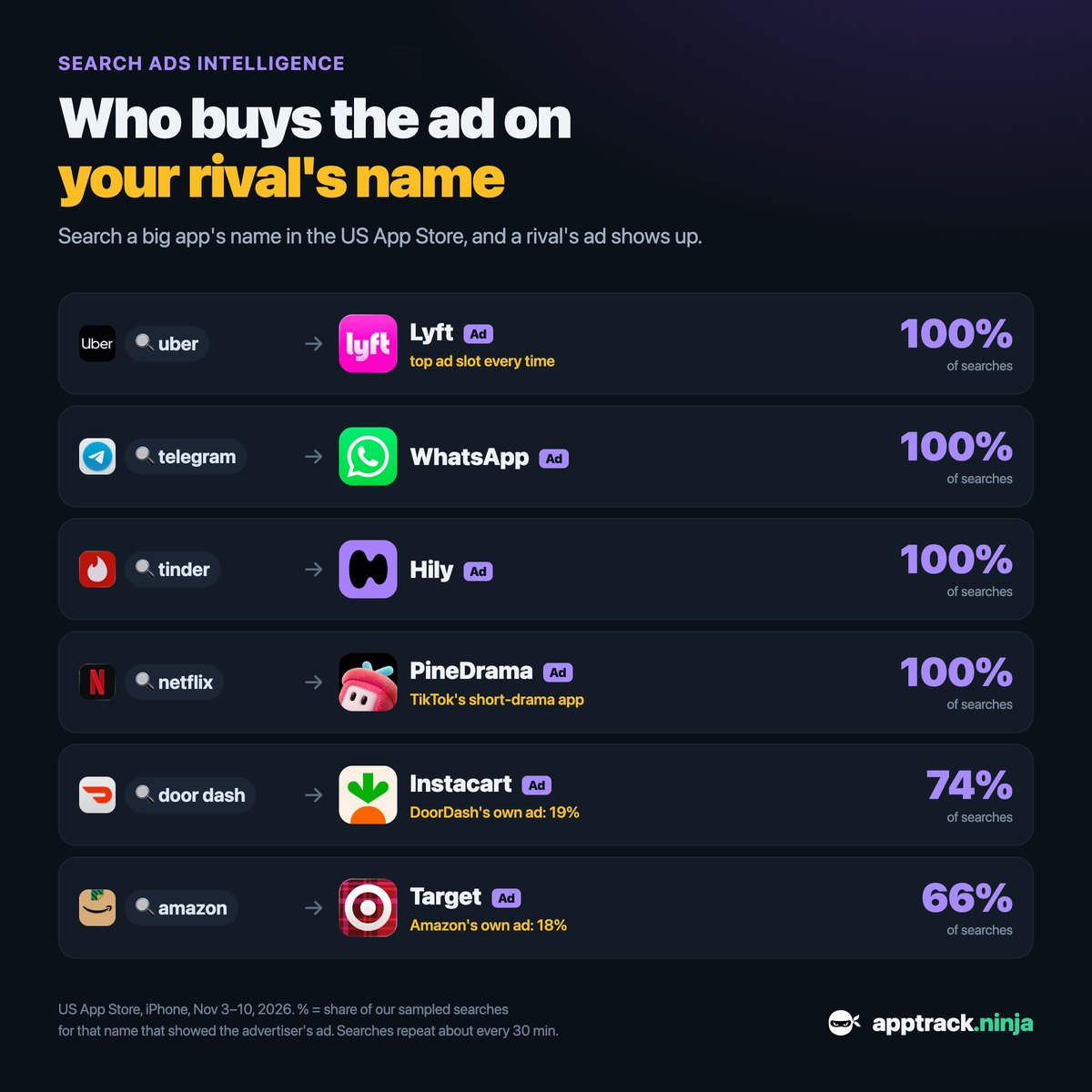
Search "uber" in the US App Store and the first thing on the page is an ad for Lyft. As of November 10, 2026, AppTrack Ninja had sampled that search 156 times in a week, and the Lyft ad was there in all 156. Five other big brand names showed the same pattern: a rival's ad in 66% to 100% of searches.
Buying the ad on a competitor's name is usually called conquesting. Below are the six keywords we measured, what the numbers mean, where they stand four days later, and how to check who advertises on your own app's name.
What is an App Store Search Ad on a brand keyword?
App Store Search Ads are the paid results in App Store search. An advertiser picks keywords, and when someone searches one of them, the advertiser's app can appear above the organic results with a small "Ad" label.
A brand keyword is a search for one specific app or company by name: "uber", "netflix", "tinder". People who type it usually know what they are looking for. These are popular searches: on our 1 to 100 search popularity scale, the six keywords in this article sit between 85 and 90.
A brand keyword is not reserved for its owner. Other apps can advertise on it, and as the data shows, they do. So two different things can happen on the same search: the owner advertises on its own name (defense), or a rival does (conquest).
Who advertises on big brand names in the US App Store?
We ran each search repeatedly from an iPhone in the US storefront and recorded which ads came back. The table shows, for each brand name, the rival whose ad appeared most often in the seven days to November 10, 2026.
| Search | Advertiser | Searches with its ad | Share of searches |
|---|---|---|---|
| uber | Lyft | 156 of 156 | 100% |
| telegram | 159 of 159 | 100% | |
| tinder | Hily | 150 of 150 | 100% |
| netflix | PineDrama | 157 of 157 | 100% |
| door dash | Instacart | 113 of 152 | 74% |
| amazon | Target | 102 of 154 | 66% |
Four rivals were there every single time. Lyft also held the first ad position in every one of its appearances. On "telegram" the picture was slightly different: WhatsApp appeared in every search, but usually as the second ad, behind Google Gemini.
The advertiser on "netflix" was PineDrama, a short-drama app published by TikTok Ltd. A short-drama app is not a like-for-like competitor of a film and series service, so conquesting is not limited to direct rivals: an app only needs to want the same audience.
What does "share" mean in Search Ads data?
- Share of searches: the share of our sampled searches for a keyword in which the advertiser's ad appeared at all. This is the percentage in the table above.
- Share of ads: the advertiser's ads divided by all ads we recorded on that keyword. A sampled search can return more than one ad, so an advertiser present in every search can still hold only about half of the ads.
- Top slot rate: of the advertiser's ads, the share shown as the first ad.
None of these numbers say what an advertiser pays, how many people tap the ad, or what it earns. They describe what a searcher sees. They are also estimates from a sample: we repeat popular searches about every 30 minutes from one device type, and results can differ between users.
Brand defense, conquesting and custom product pages
Defense is advertising on your own name so the top of the page stays yours. Conquest is the reverse. The last two rows of the table show both on one keyword: on "door dash", Instacart's ad appeared in 74% of searches and DoorDash's own ad in 19%. On "amazon", Target reached 66% and Amazon's own ad 18%.
A brand that ranks first for its own name still appears on the page without paying. The difference is position: the ad sits above the organic list, so on a phone screen the rival can be the first thing the searcher sees.
An ad does not have to open the app's default store page. An advertiser can attach a custom product page, a variant of the listing with its own screenshots and promotional text, so that the page matches the search. For a conquest ad, that can be a page written for the rival's users.
The largest conquesters here mostly did not use one. In the week to November 14, 2026, Lyft, WhatsApp, PineDrama, Instacart and Target all sent these ads to their default page. Hily ran two custom product pages on "tinder", Uber Eats one on "door dash" and Temu three on "amazon".
Where it stands now (November 14, 2026)
We read the same six keywords again on November 14, 2026, for the seven days before. This window holds more samples, 263 to 273 searches per keyword.
| Search | Advertiser | Searches with its ad | Share of searches | Share of ads |
|---|---|---|---|---|
| uber | Lyft | 264 of 267 | 99% | 55% |
| telegram | 223 of 273 | 82% | 45% | |
| tinder | Hily | 247 of 263 | 94% | 52% |
| netflix | PineDrama | 266 of 270 | 99% | 54% |
| door dash | Instacart | 198 of 268 | 74% | 40% |
| amazon | Target | 136 of 267 | 51% | 28% |
The same six rivals still lead. Lyft, PineDrama and Hily stayed above 90%. WhatsApp slipped to 82% on "telegram", where Google Gemini appeared in 58% of searches and was the first ad each time. On "amazon", Target fell to 51% while Alibaba.com (36%), Amaze GO (26%), Rakuten (24%) and Temu (20%) shared the page.
Defense stayed thin. The DoorDash consumer app's ad appeared in 21% of "door dash" searches (the separate DoorDash - Dasher app in 24%) and Amazon Shopping's in 13% of "amazon" searches. For "uber", "telegram", "tinder" and "netflix" we did not record a single ad from the brand's own app in this window.
How to check who advertises on your app's name
The useful part is knowing what a searcher sees when they type your name. It takes a few minutes to find out.
- Open Search Ads and look up your app's name as a keyword. Note every advertiser, its share, and whether your own app is among them.
- Do the same for two or three rivals' names. A keyword with a few small advertisers is easier to enter than a crowded one: on "netflix" we counted 18 advertisers in one week.
- Compare each advertiser's organic rank on that search. PineDrama's median organic position on "netflix" was 40, so the ad is its only way to the top of that page. Lyft ranks 4th on "uber" without the ad.
- Check your organic position for your own name in keyword rankings. If you are not first for your own brand, work on the title and subtitle before thinking about ads.
- Look at the creatives rivals run elsewhere in the ad library, and at whether their Search Ads use a custom product page.
What to do next depends on what you find. A rival present in most searches for your name is a reason to consider a defensive campaign on that one keyword, and to keep watching it: shares move within days, as Target's did here. A relevant rival name that nobody defends is a candidate for a small test with a matching custom product page. Whether either pays off is a question only your own campaign data can answer.
The first keywords in Search Ads are open to everyone. The full keyword list is part of Pro.